
Step 1: Firstly create the Hook File.
- Create the whmcsdefaultmenuremove.php file in the /includes/hooks/ directory
- To exclude a hook file from execution, prefix the filename with an underscore (_).
Step 2: Now find the menu which you need to hide in our case it's Account Details.
- Every menu item has a unique name that is used to reference it.
- You will need this name in order to manipulate it.
- To make it easier, we have made the name of each sidebar menu item available in the HTML source of the page, which means it can be retrieved using the Inspect Element option available in most modern browsers.
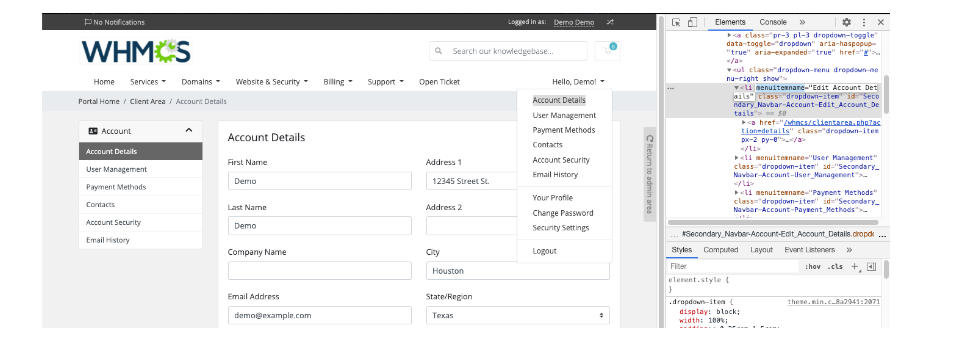
Here you can see on the right hand side that the menu item name is Account details. Now we will used this to delete the particular menu item.
Step 3: After that we will remove our menu item.
<?php
use WHMCS\View\Menu\Item as MenuItem;
add_hook('ClientAreaPrimaryNavbar', 1, function (MenuItem $primaryNavbar)
{
if (!is_null($primaryNavbar->getChild('Account'))) {
$primaryNavbar->getChild('Account')->removeChild('Account Details');
}
});

Copy and paste the above attached code in the file that you created in Step 1(whmcsdefaultmenuremove.php ) and you are good to go.
