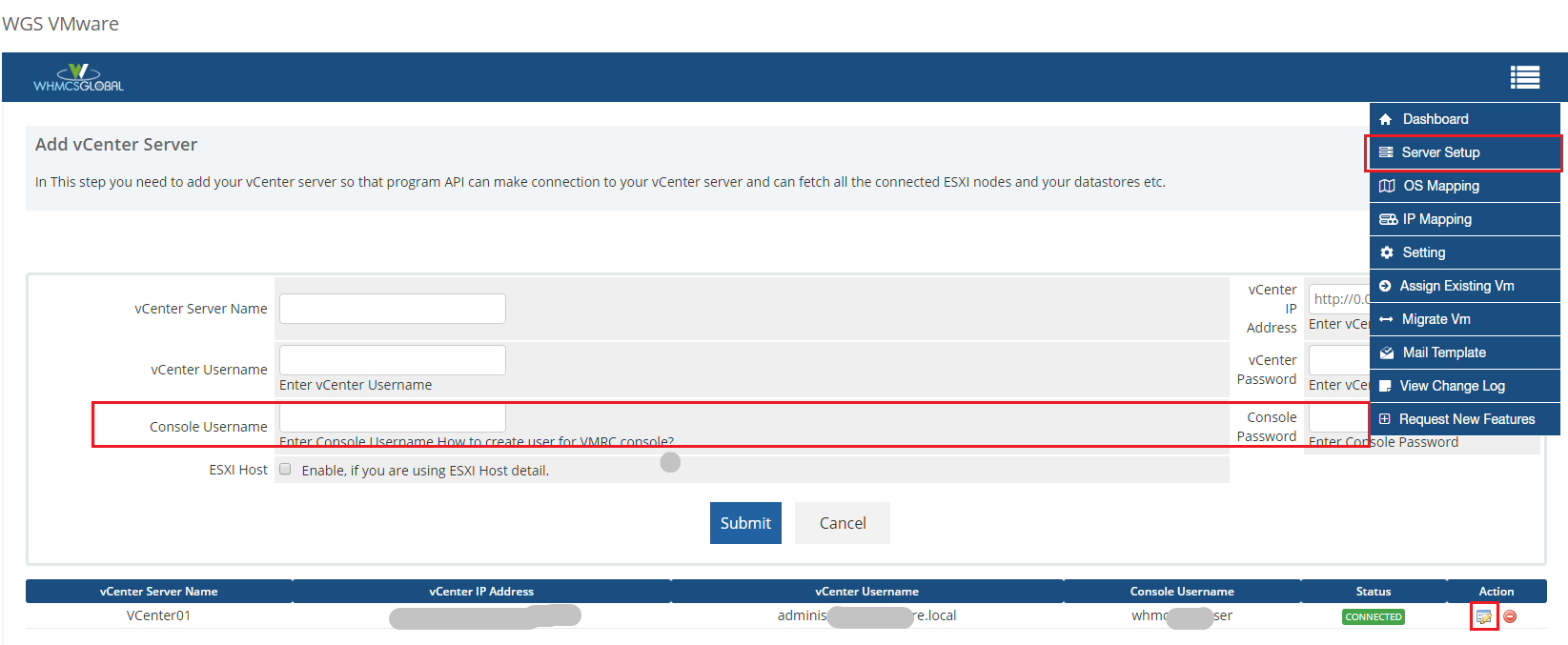
If you are getting this error "ServerFaultCode: Cannot complete login due to an incorrect user name or password.. InvalidLogin: InvalidLogin Object ( )" on "Launch Remote Console" button. This error due to wrong VMRC console credential.
We recommends that you create a new user with minimum permissions for vmrc console with your vCenter/ESXI. So, users can not manage virtual machine settings from vmrc console. Click Here to see the instructions for add new console user with your vCenter / ESXI.
Follow given below steps to configure created console user in VMware addon module
Step 1. Login as your WHMCS admin panel and then open the "WGS VMware" addon module.
Step 2. Go to "Server Setup" with "WGS VMware" addon module.
Step 3. Click on Add vCenter Server or Edit added server.
Step 4. You can see two fields like "Console Username, Console Password".
Step 5. Enter your created console username and console password under these two fields and then save the changes.